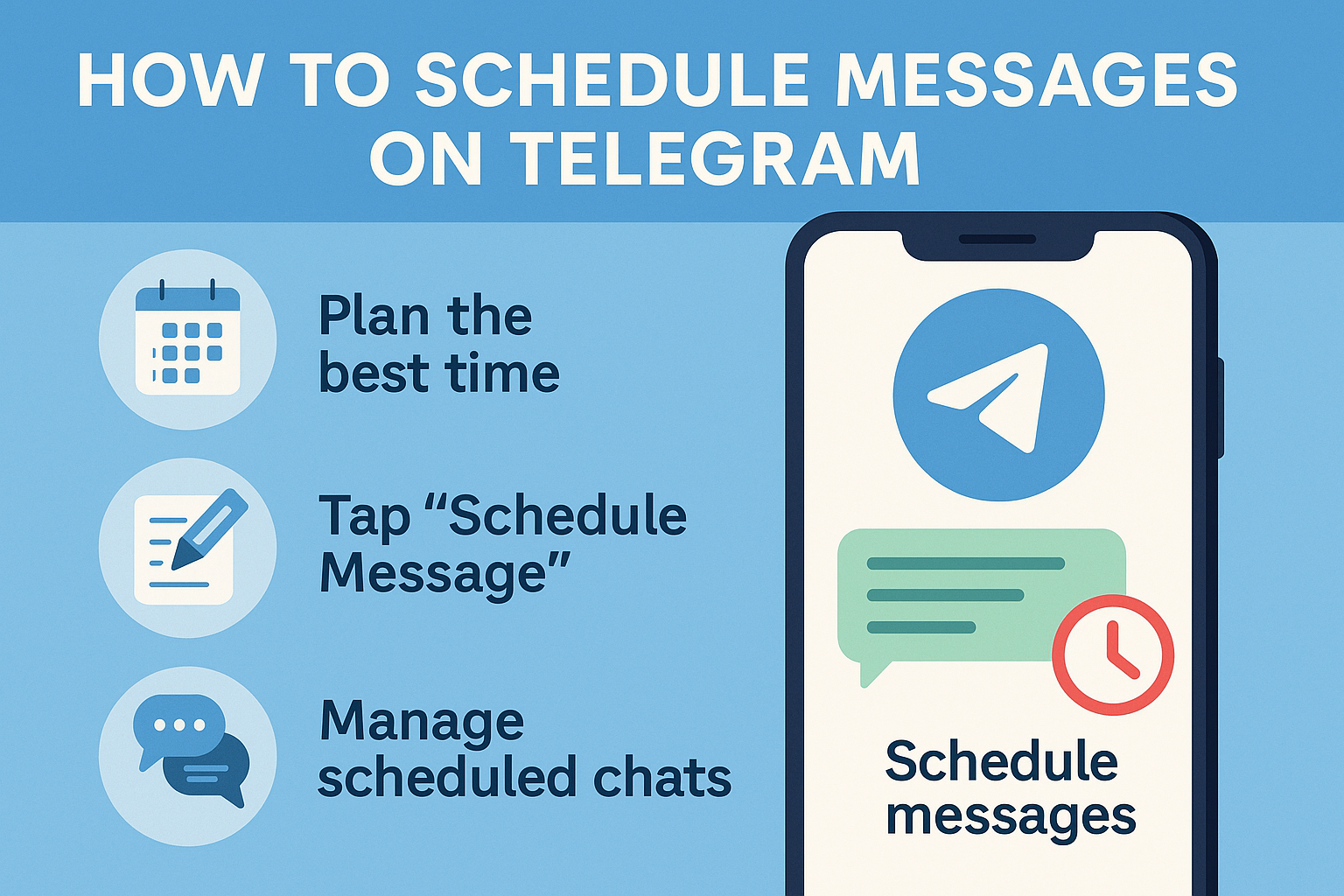
How to Schedule Messages on Telegram: Master the Ultimate Scheduling Feature for Better Communication
Never miss an important message again! Telegram’s powerful scheduling feature lets you send messages at the right time, whether you’re coordinating across time zones, planning birthday wishes, or running a business. This complete guide will show you exactly how to schedule telegram messages using both built-in features and advanced third-party tools. This will help you become a messaging master and make your communication much more efficient.
What is Telegram’s Message Scheduling Feature?
Telegram has one of the easiest-to-use scheduling systems of all the messaging apps. With the scheduling feature on Telegram, you can set a date and time for a message to be sent. This feature is available on all platforms, including the telegram app on your phone, the desktop app, and the web version of telegram. You can use it for personal communication or to run telegram groups for business.
You can use this feature to schedule telegram messages in any chat setting, including private chats, group chats, and telegram channels. Telegram lets you schedule messages ahead of time, keeping your content safe and making sure it gets delivered exactly when you want it to. Even if you’re not online, the messaging app will automatically send your scheduled content. This makes it great for coordinating across time zones.
The web and mobile versions of Telegram both support the app’s built-in scheduling feature. Telegram’s built-in scheduling system makes sure that all kinds of content, like photos and videos, are delivered on time, whether you’re managing a group chat or sending a message to individual contacts. This makes it a complete solution for planned communication needs.
How Do You Schedule a Message on Telegram Using the Native App?

Setting up a schedule with Telegram is easy to do. First, open the Telegram app and go to the chat where you want to send your message. Start writing a message in the box. You can type, add pictures and videos, or anything else you want the message to say.
Instead of just tapping the send button, you need to long press it. When you press and hold the send button, a menu with scheduling options pops up. You can schedule messages this way no matter if you’re using the telegram app on your phone or your computer. Choose “Schedule Message” from the menu, and you’ll be able to choose the exact date and time you want it to be sent.
Once you’ve picked your date and time, you’ll see a scheduled message icon that lets you know your message has been scheduled. The message will stay in a pending state until the time you set comes. After that, you can check the message box to see if your telegram message is ready to be sent automatically. This process works the same way whether you’re setting up one message or several messages to be sent from different telegram accounts.
Can You Schedule Messages on Telegram Web Version?
The web version of Telegram supports the schedule messages feature, but the interface is a little different. When you use telegram in your browser, the first thing you should do is write a message like you normally would. Depending on your browser and the version of Telegram you have, you may see the message icon in the message box or the icon in the message box near the send area.
Instead of pressing and holding the button like you would on a phone, you usually right-click the send button or look for a small clock symbol. Some versions show the scheduling option right next to the blue send arrow, which makes it even easier to find. The web interface keeps all the main features, whether you have multiple telegram profiles or just one.
The web platform is especially helpful for people who want to plan posts for several telegram channels or run group chats and channels from a computer. It’s a great choice for content creators and business users because you can easily schedule content, set a message to go out at a certain time, and see all of your pending deliveries on the scheduled messages screen.
What Are the Steps to Schedule Multiple Messages on Different Telegram Channels?

To handle more than one telegram channel, you need to be organized. To get to each different telegram channel, go to that channel and follow the usual steps. But using a third-party tool like onlysocial can make things a lot easier. You can link your Telegram account to these platforms and manage many channels from one dashboard.
With onlysocial, you can choose the telegram channel where you want to post, write your message, and set different times for each location to get it. This method is very useful whether you’re in charge of a group or coordinating content across several Telegram profiles. The platform has a single page where you can plan content for all of your social media accounts, including Telegram.
You can easily set up messages for different telegram groups and channels, whether you use telegram’s built-in features or a tool like onlysocial. This feature is very important for people who run a group chat across several communities or need to keep business communication schedules consistent.
How to View and Manage Your Scheduled Messages on Telegram?
Telegram has a special interface that you can get to through your chat options that lets you see your scheduled messages. To find the scheduled messages screen, look for a clock icon or go to the chat’s menu. This area shows all of your unread messages, including who they are for, a preview of the content, and when they will be delivered.
You can change any message that is already scheduled but hasn’t been sent yet from the messages section. You have complete control over the date and time, the content, or even the delivery itself. This flexibility lets you stay in charge of your planned communications, whether you want to send the message earlier or change the content at the last minute.
The management interface clearly shows the status of each scheduled delivery, letting you know if messages are still pending, have been successfully scheduled, or if there were any problems. You can also look at “saved messages for personal reminders” and see all of your upcoming messages in one place. This openness helps you keep track of your communication plans and makes sure that important messages get to the right people at the right time.
What Types of Content Can You Schedule on Telegram?
Telegram can do a lot more than just send text messages. You can schedule any kind of content that the platform supports, such as voice messages, polls, location shares, photos and videos, and documents. Video messages on Telegram work best when you send them at the right times, whether you’re sending personal messages to family or promotional messages.
The system keeps the quality and formatting of all scheduled content types. The scheduling feature keeps the resolution and metadata of your photos and videos when you send them, so your multimedia content will look exactly how you want it to when it arrives. For professional communications, where timing and presentation are equally important, this dependability is very important.
Telegram has the same strong scheduling support for all message types, whether you’re sending a message right away or planning content days in advance. You can even set up posts that have more than one media file, text formatting, and interactive elements. This makes it a flexible tool for both personal and business communication needs.
How Does Telegram’s Scheduling Feature Compare to Third-Party Tools?
Telegram’s built-in scheduling is good, but third-party tools offer more features. Telegram’s built-in feature is great for scheduling simple messages within the app ecosystem. It guarantees delivery and works smoothly with all of Telegram’s other features. But telegram doesn’t have some advanced features that other tools do.
Using only social media and similar sites has benefits for complicated ways of communicating. These tools usually let you send messages over and over, do advanced analytics, see your content calendar, and connect with other social media sites. They’re especially useful for companies that have more than one Telegram account or for people who need to send messages across different platforms at the same time.
It depends on what you need. For simple scheduling and personal use, use Telegram’s built-in features to set up reliable, simple message schedules. Third-party tools can help you run advanced marketing campaigns, manage your social media accounts, or schedule things in a complicated way with multiple Telegram channels. These tools can make things much more efficient and effective.
Can You Schedule Recurring Messages on Telegram?
Right now, telegram’s built-in scheduling feature doesn’t let you send recurring messages. You have to schedule each message separately. You can’t set up automatic recurring messages right in the telegram app, though. But this problem can be fixed with third-party solutions that let telegram users set up recurring messages.
External scheduling tools are very helpful when you need to send the same message over and over, like weekly reminders, daily updates, or regular promotional content. You can set up recurring patterns on these platforms, which will automatically create and schedule messages based on the frequency and timing you choose.
If you run a telegram group or channel that needs regular content updates, the recurring function saves you a lot of time and makes sure that your audience always gets the same information. The automation helps keep people interested while cutting down on the work needed to send the same message over and over again, which is not something that telegram’s current features can do on their own.
What Are the Best Practices for Using Telegram’s Schedule Messages Feature?
To use telegram’s scheduling feature well, you need to think strategically about timing, content, and the people who will see it. When you send a message, think about the time zones of the people you’re sending it to. Sending content when your audience is most active makes it more likely that they will engage with it. Plan your content calendar ahead of time, especially if you’re using Telegram for business communications or content marketing.
Always check the content you plan to send before the delivery time, especially if it is time-sensitive. The telegram app reliably sends scheduled messages, but checking your queue makes sure everything is correct and lets you make last-minute changes. The schedule feature lets you keep in touch without having to be on your device at certain times.
No matter if you’re using the mobile or desktop version of Telegram, make it a habit to check your scheduled messages screen. This habit helps you stay on top of things and makes sure you can send all of your planned messages. Think about when your audience is most active and what they like to do to get the most out of your scheduled content.
How to Troubleshoot Common Issues When You Schedule Messages on Telegram?

Most problems with scheduling come from not knowing what time zone you’re in, having trouble connecting to the network, or having trouble syncing apps. Check the time and time zone settings on your device first if your scheduled message doesn’t send at the right time. Telegram uses local time to figure out when to send messages.
When it’s time for your scheduled delivery, make sure your telegram app is up to date and your internet connection is stable. You don’t have to use the app to send messages, but your device needs to be connected to the internet for the automatic send feature to work.
If you can’t get to the scheduling feature, try restarting the telegram app or clearing the app cache. Some older versions may not have all the scheduling features, so updating to the most recent version usually fixes problems with accessibility. Also, make sure that the feature is available in your area and for your account type, as there may be some limits in some cases.
Key Takeaways
• Get the basics down: On mobile, long-press the send button to see scheduling options. On the web, look for clock icons.
• Plan ahead: When you set up your telegram messages, think about the time zones of the people who will get them and the best times for them to read them.
• Use for all types of content: Schedule text, photos, videos, voice messages, and documents with the same level of reliability.
• Manage well: Check your scheduled messages screen often to see what deliveries are still pending and make changes as needed.
• Look into third-party tools: If you want advanced features like sending messages on a schedule or managing multiple platforms, check out tools like onlysocial.
• Keep up to date: To get the newest scheduling features and improvements, keep your Telegram app up to date.
• Think globally: When you have to deal with more than one telegram profile or talk to people from other countries, keep in mind that the time zones are different.
• Stay flexible: Keep in mind that you can change or cancel messages that are already scheduled before they are sent.
• Set the best time: Send messages when your recipients are most likely to be busy and interested.
• Troubleshoot ahead of time: Check your timezone settings and make sure your internet connection is stable so that messages are delivered reliably.

Buy Telegram members ico
In today’s fast-paced cryptocurrency landscape, building a strong, active community is crucial for any Initial Coin Offering (ICO) project aiming for success. One of the most effective ways to establish credibility and attract investors is by expanding your Telegram group. If you are planning to buy ICO Telegram members or buy Telegram members crypto-specific, you’re making a strategic move toward enhancing your project’s online presence and overall appeal.
Why Telegram is Essential for ICO Campaigns
Telegram has become the backbone of crypto communications. Its features like encrypted chats, massive group capacities, and bot integrations make it an ideal platform for ICOs and blockchain initiatives. In fact, many successful ICOs attribute a significant part of their growth to robust Telegram communities.
A strong Telegram group:
- Builds investor trust
- Facilitates direct communication
- Enhances community engagement
- Increases project visibility
When you buy ICO Telegram members, you’re laying the groundwork for a successful and impactful crypto campaign.
The Impact of Having a Large Telegram Community
Numbers matter. A large Telegram group signals popularity and legitimacy, creating a psychological trigger known as “social proof.” Potential investors are more likely to explore and invest in a project that has an active, thriving community.
Moreover, an engaged group can:
- Provide real-time feedback
- Offer organic marketing through word of mouth
- Create buzz around token launches and major updates
- Foster a loyal base of early adopters and evangelists
Why You Should Buy Telegram Members Crypto-Focused
Not all members bring the same value. Crypto-savvy members are particularly valuable because they:
- Understand the nuances of blockchain technology
- Are more likely to participate in token sales
- Contribute meaningfully to discussions
- Act as micro-influencers within the community
By choosing to buy Telegram members crypto-related, you’re ensuring that your group isn’t just large, but also filled with individuals who are genuinely interested in cryptocurrency projects like yours.
How to Buy ICO Telegram Members Safely
Buying Telegram members can be highly beneficial, but it’s important to proceed wisely:
- Choose reputable providers with positive reviews.
- Avoid services that deliver bots or fake accounts.
- Opt for gradual member addition to mimic natural growth.
- Ensure the members are crypto-interested for better engagement.
Doing due diligence before you buy ICO Telegram members ensures that you build a healthy, sustainable community that adds real value to your project.
Advantages of Buying Telegram Members with Crypto
In the spirit of decentralization and financial freedom, many services now allow you to buy telegram members with crypto. This method of payment offers several advantages:
- Faster transaction processing
- Enhanced privacy and security
- Lower transaction fees compared to traditional banking methods
- Alignment with your project’s crypto-based identity
Utilizing cryptocurrency for such transactions demonstrates your commitment to the ecosystem you are helping to build.
When is the Best Time to Expand Your Telegram Group?
Timing can greatly affect the success of your Telegram marketing strategy. Ideal moments include:
- Before launching your ICO or token presale
- During major partnership announcements
- Before exchange listings or platform releases
- Throughout your marketing campaign to maintain momentum
Expanding your Telegram group at the right times maximizes investor interest and keeps your community dynamic and engaged.
Post-Purchase Strategies for Sustained Growth
Buying members is only the first step. To turn your boosted numbers into a thriving community, implement strategies such as:
- Hosting regular AMAs (Ask Me Anything sessions)
- Providing frequent project updates
- Engaging users with polls, contests, and airdrops
- Offering exclusive incentives for active participation
Consistent interaction ensures that new members become invested in your project’s success and remain active contributors.
Common Mistakes to Avoid When Buying Telegram Members
Avoiding pitfalls is crucial to ensuring your efforts lead to success. Some mistakes to watch out for include:
- Focusing solely on quantity over quality
- Adding too many members too quickly, which can trigger Telegram’s anti-spam measures
- Ignoring community management after buying members
By staying mindful of these challenges, you can protect your project’s reputation and maximize your return on investment.
The Role of Community Management After Buying Members
Managing your community effectively after purchasing members is essential to long-term success. Key aspects of good community management include:
- Promptly answering questions
- Encouraging open discussions
- Rewarding constructive contributions
- Monitoring group health and removing spam
A well-managed group not only retains members but also attracts new organic growth through positive word of mouth.
How Buying ICO Telegram Members Enhances Your Marketing Funnel
Think of your Telegram group as the top of your marketing funnel. A bigger, active community:
- Increases awareness
- Nurtures interest
- Builds desire
- Drives action (i.e., token purchases)
By integrating Telegram group expansion into your broader marketing strategy, you create a cohesive path that guides potential investors from discovery to conversion.
Is Buying Telegram Members Ethical?
Some may wonder about the ethics of buying Telegram members. It’s important to remember that:
- Marketing is about perception and influence
- Early momentum often requires a catalyst
- As long as the added members are real and interested in crypto, the practice aligns with common marketing principles
Transparency and ongoing engagement are key to maintaining ethical standards while leveraging the benefits of a larger community.
Choosing the Right Provider for Telegram Member Growth
A quality provider should offer:
- Real, crypto-focused members
- Gradual, natural-looking growth
- Responsive customer support
- Clear service guarantees
Always research multiple options and read customer reviews before committing to a service to buy ICO Telegram members.
Boost Your ICO’s Visibility with a Powerful Telegram Community
Ultimately, a robust Telegram community is a powerful asset for any ICO or blockchain project. When you buy ICO Telegram members and buy Telegram members crypto-specific, you’re setting the stage for greater visibility, stronger investor confidence, and enhanced project success.
By choosing to buy telegram members with crypto, you not only make the transaction seamless and secure but also reinforce your project’s alignment with the decentralized economy.
Don’t let your ICO fade into the background. Take proactive steps today to build a thriving community, generate buzz, and secure your place in the future of blockchain innovation. Ready to elevate your project? Buy ICO Telegram members and watch your crypto vision come to life!

Prevent the addition of annoying bots in Telegram groups
What can we do to prevent annoying robots from being added so that the advertising and obscene bots don’t hit us and send messages?
One of the methods used by developers of annoying bots is to increase the visual views of posts. Many users promise to increase their Telegram traffic in exchange for money from business owners. These advertisers produce immoral bots with obscene and absorbing images and import them into various Supergroups, then the malicious robot sends immoral photos along with channel links in groups. Interestingly, the purpose is not to spread obscene content. In fact, these bots with false promises encourage users to install malicious programs, which is very dangerous.
If you are a member of chats that have bots like this, do not click on the link of the messages of these robots in any way, so as not to increase the number of members and see the messages of the relevant channel and do not help profiteers in achieving dirty goals. And click Report and then Spam to be checked by Telegram.
How to prevent the robot from entering the group
If you are the manager of a super group, you must have seen that spammers add bots to your group that are unpleasant and promotional. To prevent these bots, you need an anti-spam bot that you can secure your group at a monthly cost.
But you may not have the cost of anti-spam and you don’t want to pay for it, so you have to look for a way to do it yourself. This trick is very useful and there is no danger for your group, you have to make 20 bots and put it in your chat. Robots don’t have to be active or they have to be group managers, just being a member of the group is enough and your work will start.
To prevent the addition of annoying bots, first log in to the Botfather bot and then tap / Newbot . Now select a name and then an ID for it. Do this up to twenty times. That is, actually make twenty bots for yourself.

Now enter the group and edit every twenty bots. To do this, go to your chat and click on the pencil from the top menu, in the Members section above, write Add Member that you have to click on it, and then search for the individual IDs of the bots and click Add to add them.
Due to the restriction of adding robots to telegram groups, no one can add a new robot to your group and you will get rid of annoying robots forever. (This will increase your channel membership.) These bots have no activity and no interference for you and your members, so do it with ease so that you can secure your group by preventing the addition of annoying bots.
Click , for buy telegram members

Buy telegram members india
Telegram is one of the largest social networks in the world, with more than 400 million monthly active users. It is gaining popularity in many countries every day.
One of the countries where Telegram has become very popular is India.
Businesses and individuals can create a channel or group on the Telegram social network and increase the sales of their services or products through the created channels.
The more channel members a business has, the more users trust it.
How to increase Telegram members ?
Telegram channels is a great way to broadcast a message to a large set of audiences instantly. Having a large subscribers count in your channel would make real members attracted to your channel. You can start advertising in your channel and make huge money after attracting subscribers for it.(Bot telegram members)
There are 2 ways to increase your channel / group members in Telegram. (Long method and fast method)
Long method :
In the long run, you increase the number of members of your channel by placing quality content and sharing with similar channels.
Fast method (recommended) :
In this way, you buy a member for your channel / group at a low cost.
for example : ( 1,000 Bot Members only 5$ and 10,000 Bot Members only 39$ )
How many users do the Telegram have?
Since its launch in 2013, Telegram has taken the world by storm.
Before the presentation of this popular social network, Viber faced with a lot of disorders. Telegram didn’t receive much attention but when disorders in sending and receiving messages occurs in Viber in a period of time , users had to use Telegram and up to now they are very satisfied with using Telegram services. This app has 400 million users now and the owners of it say that one million users join to it every week. Also they add one billion message that are sent by this messenger every day.
What are our services?
How long does it take for members to be added to my channel?
About 24 hours
If I buy ten thousand members, will you add 10,000 members to my channel?
Yes – with some gifts (about 10%)
Will the members leave my channel?
Depending on the number of messages you send on the channel and the quality of your content, some will be leave .
To buy Telegram members, contact us
Telegram Support : @ashaco
How to Create folders in Telegram
After submitting Telegram in exchange for users’ requests for sharing or the same folder of group and chat channels, this option has finally been added in version 6 of Android and iPhone, and it has been well received.
For several years, users have been asking Telegram to categorize the conversation into the original Telegram, but I don’t know why Telegram finally gave up after 6 years and has provided the ability to fold the conversations. However, many say that the design of the chat category has copied from unofficial telegrams such as Plus Messenger.
If you have too many chats, you can now separate chats from groups and channels. Then drag your finger between the tabs to quickly access each of your chats.
Category (folder) Telegram chats
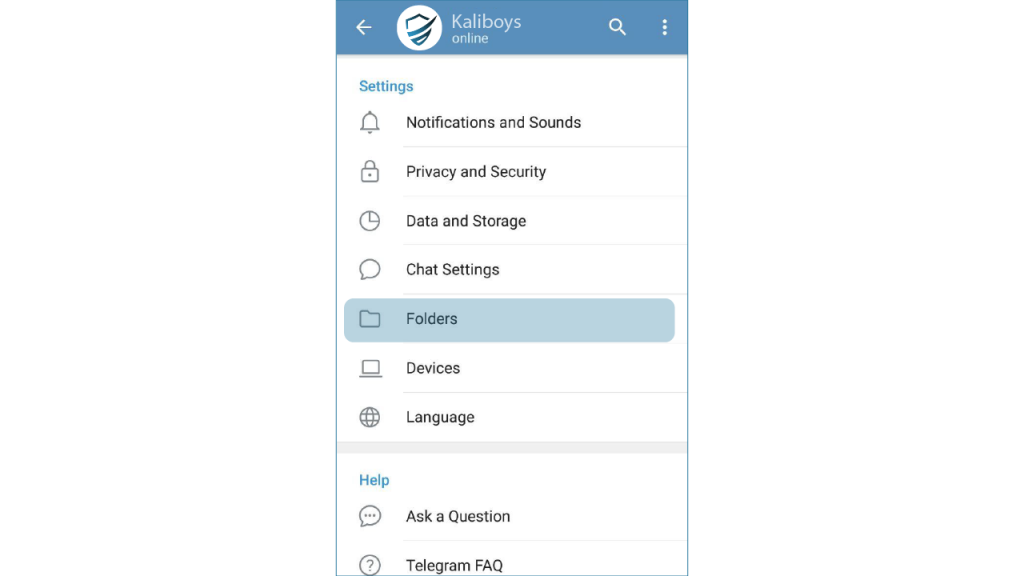
To categorize or fold chats, open the Telegram drop-down menu by tapping the top three lines on the left, and then click Setting. On the Settings page, click Folders.
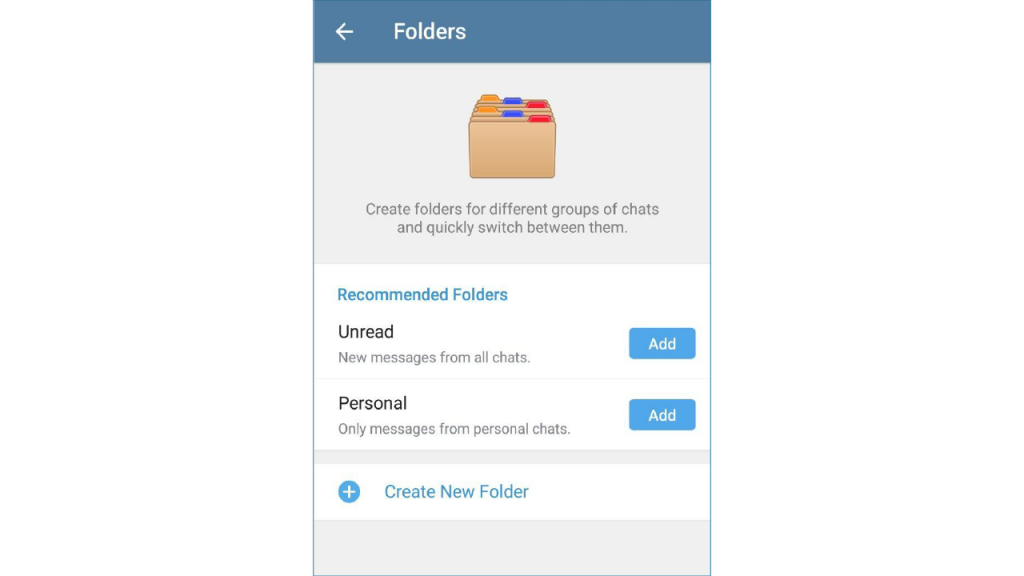
In the opened page, there are some recommended folders that you can use to categorize your chats if you wish. The Unread folder is not read for categorizing messages, and the Personal folder is for categorizing personal messages. Click Create New Folder to add other categories.
On this page, click Add Chats to create a new folder and select the category type. By tapping Groups, groups are placed in this folder, by tapping Channels, channels are placed in this folder, by tapping Bots, robots are placed in this folder, by tapping Contacts, contacts are placed in this folder, and by tapping Non Non-contact contacts are included in this folder. After selecting the categories, write a name for your folder and click Save.
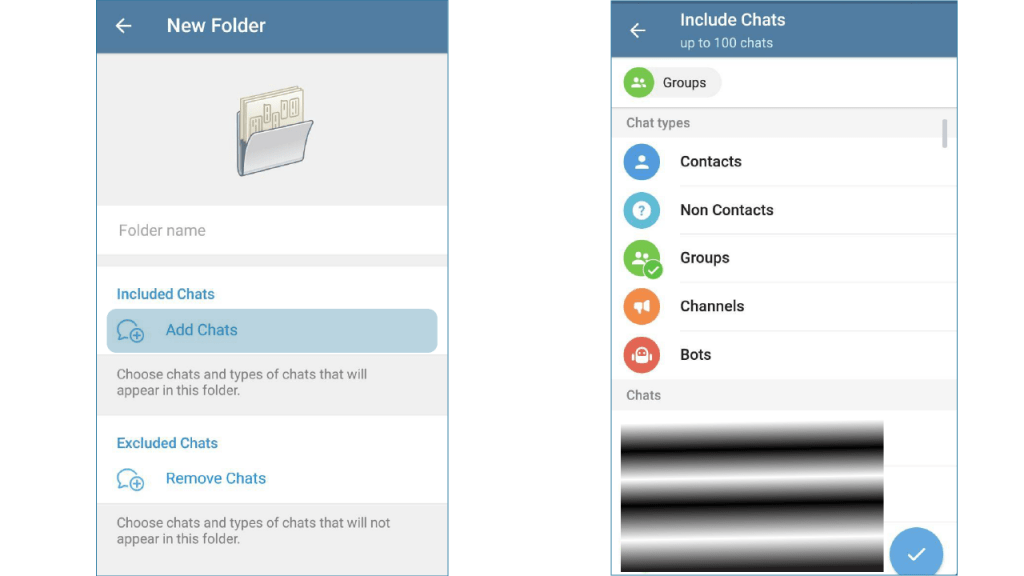
You can select a combination of these conversations or just one type in each folder. For example, you can put a combination of channel and group conversations in a folder, or just put groups in a folder.
In addition, you can also create custom folders. You can categorize up to 100 conversations in each folder. You can create folders with custom conversations by tapping on channels, groups, and. At the bottom. For example, you can create folders called my favorites, movies, musics, media, news, etc., which is a combination of groups, channels, and so on.
How to Buy Telegram Members Using Bitcoin in 2025
In today’s digital landscape, Telegram remains a top choice for businesses, influencers, and communities looking to connect, broadcast, and build. With over 700 million monthly active users and growing, standing out on Telegram requires more than just quality content; it demands visibility. One increasingly popular method is to buy Telegram members using cryptocurrency. Whether you’re looking to boost your credibility or kickstart engagement, this approach offers a seamless, anonymous, and secure route. In this guide, we’ll walk you through everything you need to know about how to buy Telegram members with crypto in 2025, and why it’s more relevant than ever.
If you’re specifically interested in how to buy Telegram members with crypto or are searching for the most efficient ways to buy Telegram members crypto, this in-depth article is tailored for you.
Why Buy Telegram Members in the First Place?
Before we delve into Bitcoin and crypto payments, it’s essential to understand the “why.” Buying Telegram members can:
- Enhance your channel’s credibility.
- Attract organic followers through social proof.
- Improve your channel’s ranking and visibility.
- Kickstart new projects or products with a larger audience.
In essence, buying members can act as a catalyst for organic growth. But how you buy them—especially in terms of payment—can greatly impact the safety and efficiency of the process.
Benefits of Buying Telegram Members with Bitcoin and Crypto
- Privacy and Anonymity: Crypto transactions don’t require sharing personal information, making them ideal for those prioritizing privacy.
- Global Accessibility: No matter where you are in the world, crypto payments can be sent and received seamlessly.
- Fast Transactions: Especially with Bitcoin Lightning or stablecoins like USDT and USDC, transactions can be completed in minutes.
- Avoid Banking Restrictions: In countries with strict banking policies or payment limitations, crypto provides a workaround.
- Lower Fees: Traditional payment methods often incur heavy transaction fees. With crypto, these costs are significantly reduced.
Choosing the Right Platform to Buy Telegram Members with Crypto
Not all service providers are created equal. To avoid scams or ineffective services, ensure the provider:
- Has transparent pricing.
- Offers real or high-quality active members.
- Has customer support.
- Accepts a range of cryptocurrencies.
- Has verifiable reviews or testimonials.
A good example of a reliable service is TelegramMember.co. This platform is known for providing high-quality Telegram subscribers with fast delivery and excellent support. If you’re looking for a safe and reputable place to buy Telegram subscribers, this is a top choice to consider.
Step-by-Step Guide to Buying Telegram Members Using Bitcoin
1. Choose Your Service Provider
Research and pick a provider that supports crypto payments, offers real Telegram members, and has transparent policies.
2. Select a Package
Most providers offer different packages based on the number of members. Choose one that suits your budget and growth goals.
3. Enter Channel Details
You’ll need to provide a link to your Telegram channel or group. Make sure it’s set to public during the delivery period.
4. Choose Payment Method (Bitcoin/Crypto)
Select Bitcoin or another supported cryptocurrency like Ethereum, Litecoin, or stablecoins. You’ll be shown a payment address or QR code.
5. Complete the Payment
Send the exact amount to the wallet address. Wait for the transaction to confirm (usually 5–30 minutes).
6. Confirm Delivery
Once the payment is received, most services begin processing your order. Delivery timelines can range from minutes to a few hours or days, depending on the size.
7. Monitor Growth
Watch your Telegram channel grow. Track engagement, new members, and performance metrics to ensure your investment is paying off.
Tips for a Successful Purchase Experience
- Use Reputable Wallets: Trust Wallet, MetaMask, and Coinbase Wallet are solid choices.
- Always Confirm Wallet Addresses: Double-check before sending any funds.
- Use Stablecoins for Predictable Value: If you’re concerned about Bitcoin price fluctuations, opt for USDT or USDC.
- Avoid Suspiciously Cheap Offers: If it sounds too good to be true, it probably is.
- Check Refund Policies: Make sure the provider has a clear policy in case of delivery failure.
Crypto Options Beyond Bitcoin
While Bitcoin is the most popular cryptocurrency, many services now accept other options:
- Ethereum (ETH) – widely accepted and fast
- Litecoin (LTC) – low fees, quick confirmation
- Tether (USDT) – price-stable
- Binance Coin (BNB) – supported by major platforms
Using these alternatives can often reduce your transaction time and fees.
Is Buying Telegram Members with Crypto Safe?
Yes—if done right. The key is using a legitimate service provider. When you pay with crypto, the transaction is irreversible, so verifying the provider’s reputation is essential.
Always:
- Read customer reviews
- Verify payment instructions on the official site
- Avoid intermediaries and third-party agents
Integrating Member Growth with a Broader Marketing Strategy
Buying Telegram members should be one piece of a bigger marketing puzzle. Combine it with:
- Quality content creation
- Consistent posting schedule
- Engagement tactics (polls, giveaways, Q&A)
- Cross-platform promotion (Instagram, YouTube, Twitter)
- Paid ads and influencer partnerships
When used strategically, buying members can amplify your other efforts and drive even more organic traffic and engagement.
Final Thoughts: Why Crypto is the Future of Digital Payments
Crypto is no longer a niche option—it’s mainstream. Businesses and marketers are increasingly turning to crypto payments for the speed, accessibility, and freedom they offer. Whether you’re a content creator, a brand, or a startup looking to make a mark on Telegram, using Bitcoin and crypto to buy members is a smart, forward-thinking move in 2025.
As discussed, choosing to buy Telegram members with crypto is not only about convenience—it’s also about staying ahead of the curve. If you’re looking to buy Telegram members crypto securely and quickly, make sure to go with a trusted provider like TelegramMember.co.
Your success on Telegram starts with a strong foundation. Build it smart. Build it with crypto.

Telegram’s new update with video editing capabilities and animated stickers released
Telegram messaging service has recently released another new and attractive update for its mobile application. This time we see the unveiling of a new video editor to improve the quality of video sharing. The new video editor, like the relatively comprehensive Telegram image editor, allows users to set a wide range of options before uploading their videos. Users can also allow the app to automatically adjust the image quality. Simple zooming through gestures allows the user to simply select the frame of the video they want.
Along with the video editor, we now see the addition of animated stickers. This feature allows you to place all the stickers on the videos. Users are even able to type a text or draw their desired patterns on videos; A feature similar to that can be seen in Snapshot or Instagram apps. Users can now add animated stickers to any shared media content (including still images) through the app.

Also, the latest update has a new GIF search feature based on emoticon emoticons. This feature allows the user to quickly search for classified GIF files based on popular emoticons such as thumb or eye. By navigating the folders, you can add and hold your finger on the chat content to add it to a folder or delete it.

Finally, the app now offers new animations to Android users to send, edit or delete messages. The cache management and voice messaging plugin now has a new user interface. The video player plugin has been updated with the aim of faster hiding of captions and control commands. The 2-step authentication page has also been updated.
The new Telegram app is now available for both Android and iOS platforms.

How to Report and block a channel
Sometimes we need to report the Telegram group to be blocked, the way to filter or block the channel or group in Telegram is not so easy, but it can be done with effort and follow-up, if the required number of reports to close the channel is closed. Telegram is a lot.
Cyberspace, with all its goodness and meeting everyday needs such as news, intimate conversation environments and business meetings, etc., can sometimes be very destructive and immoral.
Telegram, with its countless users inside the country, is also plagued by immoral and ugly issues, and instead of using this useful tool properly, we are spoiling the youth by broadcasting obscene content in it, and we are showing ourselves in the world. And this has given a lot to the Islamic country and our several thousand years to show ourselves in this world.
Fortunately, Telegram deals with obscene content and blocks accounts and channels of immoral content, but the number of channels and groups is so large that it is not possible to block all of them, so in Channel and Group there is an option called Report that you can Tell the Telegram that this channel is against the rules and will block it.
How to report Telegram Group
To filter the obscene channel or…, first enter the desired channel and then select Report from the top three points on the right.

Then you will be faced with several options that you can report and record according to the content of the channel.
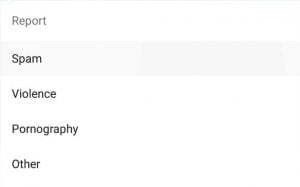
In the top 4 options, if you click on the content channel or Alki Yazareh, select the first option, Spam. (Pornography) by selecting this option, register your report and in the fourth option, if you encounter other criminal content such as theft, fraud, forgery of names and companies, etc., you will be severely affected.
Number of reports required to block Telegram channel
It is not clear how many people will report so that the Telegram channel will be closed. Don’t think that this channel will be blocked only with your report. Failure of the rules to block it
You can also report emails produced by users, channels, and unlicensed robots via email [email protected] or [email protected].
Click , for buy telegram members

Creating a Telegram theme for Android and iOS (Telegram theme maker)
One of the most attractive features of Telegram is the ability to create a Telegram theme for this messenger. These messengers have recently introduced the feature of creating themes and skins without any program that Telegram lovers of Android, iPhone, Windows can use this tool.
Telegram’s popular encrypted messengers support version 3.17 of new themes. In addition to the large number of themes, you can now create custom themes with the new theme editor. Normally, with Chat Settings, there are several default themes, blue, dark, and , which you can choose from. For example, a dark theme is great for the night, and in addition to eye health, it also helps reduce phone battery consumption.
Making a theme for Telegram (Android phones)
Telegram themes are part of an open platform, meaning that like stickers and robots, anyone can create a theme and create a conversation environment with new colors and stunning backgrounds. Follow the steps below to create a new custom theme:
Open your telegram as usual Go to Settings and select Chat Settings, click on the top three corners here and click Create new theme
Here is a window that opens CREATE THEME, then asks you to choose a name for your theme.
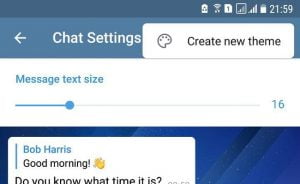
Now tap on the palette symbol.
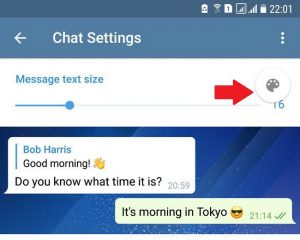
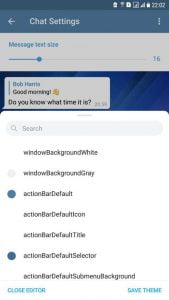
The following window will open and you will be able to change the color of the menus and text and.. This section has many options that require a lot of time to be able to color each item. Then save and select the Save Theme option.
Select the desired theme for Telegram
Go to Settings and select Chat Settings, select Show all Theme here
Now in the Custom themes section, select the skin you created to be selected as your Telegram skin
Through the three dots next to the shell, you can edit it again and fix its flaws, or share it with your friends from the Share option.
Click , for buy telegram members

The new update makes Telegram more attractive than ever
Telegram has released its new update, version 6.2, with attractive features.
In the new version of Telegram, you can use animated stickers on your photos and videos and make them more attractive. Photos to which animated stickers are added are automatically converted to gifs.
Telegram has changed the search for gifs, and now its panel has waves that you can select to find related gifs faster, and you no longer need to search for gifs by searching for different English words.
GThe gif panel also includes the Trending section, which shows you the popular gifs these days.
GThe speed of loading gifs in this section has now increased, and in addition, by holding your fingers on each gif, you can add it to your gif collection.
Another practical feature is the ability to add or remove different people from folders, which makes it easy to use.
Video below 30 seconds is already repeated as gifs.
You can download this new update for Android and iOS.
In the new Telegram update, when it is added to the animated sticker image, the photo will be automatically converted to GIF.
Click , for buy telegram members