Article
How Add Bot To Telegram Messenger?

Telegram robots are one of the interesting and useful features of Telegram, these robots are able to receive and send messages automatically and can be used by many people 24 hours a day.
Telegram bots connect to Telegram servers via API and https protocol.
How do we find out that the messages are from the bot?
At the end of the robot ID is the word bot.( @namebot ) and Bots are not the last time they are online, and the bot is always displayed for them.
Add bot to Telegram
To add robots to Telegram, search for the robot's name in the Telegram search bar, and after clicking on it and opening the robot's page, click the Start button.
How to add or remove a bot to a Telegram group

First, enter the robot settings and click on the three dots according to the photo.
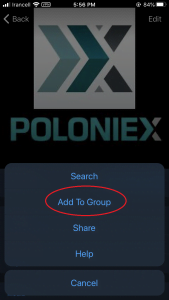
Then click "Add to Group".
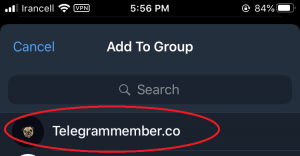
Select the group to which the robot is to be added.
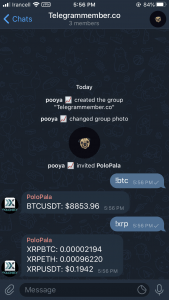
The robot has been successfully added to your group, you can now work with it. Note that all your messages in the group can be viewed by all members.
Because Telegram robots are programmable, the commands you can use with the robot are completely different for each robot, created by the robot's programmers. Telegram bots are very diverse and offer a variety of features.
How to remove bot from Telegram group
You have a simple task to remove a robot from the Telegram group, just find and remove the robot group in the list of users like a normal user.
How do I create a telegram robot?
To create a telegram robot you need a programmer, a server and a API to connect.
Telegram has opened your access to all kinds of Telegram robots, and many robots, especially commercial robots, are added to the list of Telegram robots every day. Perhaps the most important feature of Telegram, which distinguishes it from other social networks, is this robot. Telegram.
You need to buy a Telegram channel or group member to grow your business in Telegram and attract more members to your channel or group.
One of our services is Buy Telegram subscribers
We always try to provide you with the right services to grow your business.Given that Telegram attracts more and more users every day, it is better to create your business page on Telegram's social network as soon as possible.
Related articles

How to Add Members to a Telegram Bot and Get Started Easily

How to Add Members to Telegram Channel in 2025 – Complete Guide

Telegram post views bot free
How to Download and Install Telegram on Android and iOS Devices

Add Telegram fake members

Step-by-Step: Using a Telegram Views Bot for Telegram Post Views
Comments
No comments yet. Be the first to share your thoughts.