Article
How to Download Stickers in Telegram: A Fun and Easy Guide
stickers have become fun ways to showcase emotions like love, humour in addition to enhancing conversations. If you’re a Telegram user, you probably already know how much people love stickers. They’re everywhere—from adorable animals and funny memes to elaborate illustrations that help convey complex emotions. But what if you want to get in on the action and download some cool stickers for yourself? No worries! In this guide, I’ll walk you through exactly how to download Telegram stickers, share some personal tips, and help you become a sticker pro in no time.
Why Telegram Stickers Are So Popular
Telegram stickers stand out because they offer something more than just your average emoji. Unlike traditional stickers or emojis on other messaging apps, Telegram stickers are often high-quality images, creatively designed by users around the world. They’re also incredibly versatile—you’ll find stickers for just about every situation, from expressing excitement to sarcastic comebacks.
I remember when a friend first introduced me to Telegram stickers. He sent me this hilariously expressive sticker of a grumpy cat, and I couldn’t stop laughing. It was such a perfect reaction to our conversation that I immediately wanted to find more like it. Since then, stickers have become an integral part of my chats.
Step 1: Discovering Sticker Packs
There are several ways to find sticker packs on Telegram. Let’s start with the most straightforward methods:
- From Conversations
Ever noticed how you can tap on a sticker that someone sends in a chat? When you tap on it, Telegram gives you the option to view and download the entire sticker pack. This is one of the easiest ways to build your sticker collection.Real-life tip: Whenever I chat with friends, I keep an eye out for cool stickers they use. If I like one, I just tap it and add the pack. Now we can seamlessly find an unexpected star which was hidden - Browsing Telegram’s Built-In Sticker Library
Telegram has an official sticker directory that makes finding stickers super easy. To access it:- Open a chat.
- Tap the sticker icon.
- Tap the ‘+’ icon, which opens up the sticker panel.
- Browse through the trending or recommended packs.
- Sticker Channels
There are numerous Telegram channels dedicated entirely to sharing stickers. Simply search for “sticker packs” in the Telegram search bar, and you’ll find tons of public channels offering new packs daily. Once you find a pack you like, just tap the link, and Telegram will prompt you to add it.
Step 2: Downloading Stickers
Once you’ve found a sticker pack you want, downloading it is a breeze:
- Tap on the sticker pack link or preview.
- Once it opens, you’ll see an ‘Add’ button at the bottom.
- Tap ‘Add’, and the sticker pack will be instantly downloaded and ready to use in your chats.
After adding the pack, it becomes available in your sticker panel, and you can access it whenever you want by tapping the sticker icon in the chat window.
Step 3: Using and Organizing Stickers
Downloaded some great sticker packs but feeling overwhelmed by the sheer number of options? Don’t worry—Telegram makes it easy to manage and organize your stickers:
- Reorder Your Sticker Packs
Go to Settings > Stickers and Masks. From there, you can reorder your sticker packs based on your favorites or frequently used ones. Just drag and drop the packs in the order you prefer. - Remove Unused Packs
If your sticker collection has gotten out of hand, you can always remove packs you don’t use anymore. In the same Stickers and Masks menu, tap the trash icon next to any pack you want to delete.
Personal anecdote: At one point, I had over 50 sticker packs. It was chaos! I couldn’t find the ones I wanted without scrolling endlessly. Eventually, I took 10 minutes to clean up my collection and keep only the best ones. Now, my sticker game is way more efficient!
Bonus: Creating Your Own Stickers
Did you know you can make your own custom stickers on Telegram? If you’re feeling creative or want something uniquely personal, Telegram’s @stickersbot makes it super simple. Here’s how:
- Search for
@stickersin Telegram and start a chat with the bot. - Please follow the on screen instructions to set up a different sticker pack.
- Upload your images (Telegram recommends 512x512 pixels for best results).
- Once done, the bot will generate a link to your new sticker pack, which you can share with friends or keep for personal use.
I once made a sticker pack of my pet dog’s funniest photos, and it was a hit among my friends. It added a fun personal touch to our conversations. If you have cute pet pictures or memorable moments, why not turn them into stickers?
Final Thoughts
Telegram stickers are a fantastic way to make your chats more engaging, expressive, and fun. Whether you’re downloading pre-made packs or creating custom ones, stickers offer endless possibilities for creativity. Plus, they’re super easy to find, download, and organize.
So next time you’re chatting with a friend, try using a sticker instead of typing out a reply—it might just make your conversation a lot more interesting! And don’t forget to explore Telegram’s vast sticker library—you never know what hidden gems you’ll discover.
Related articles
How to Add and Use Stickers on Telegram: The Complete Guide to Telegram Sticker Packs and Custom Stickers
How to Download and Install Telegram on Android and iOS Devices

Best Telegram Subscriber Generator in 2025 (Safe & Easy)

Add Members to Telegram Channel or Group Using Username – Easy Method
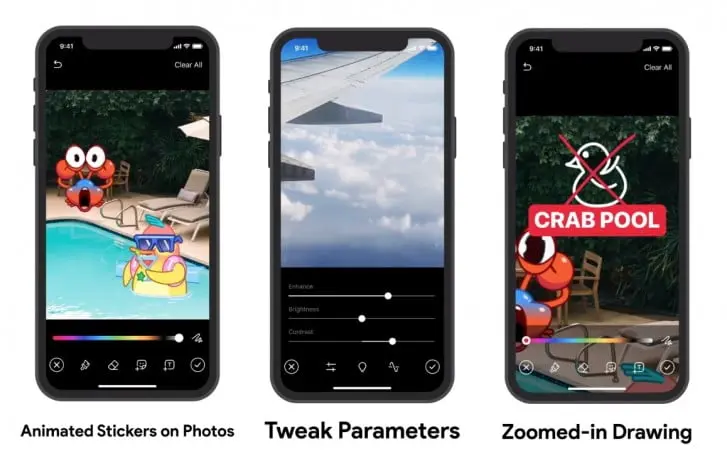
Telegram's new update with video editing capabilities and animated stickers released
How to Find Telegram Downloaded Files on Android: Complete Guide to Locating Your Downloads
Comments
No comments yet. Be the first to share your thoughts.