Article
What Are Telegram Stars? How to Get Them and Where to Use Them
What Telegram Stars are, the three official ways to get them, everything you can spend them on, and how channel owners earn and withdraw them, from my own experience running channels and bots.
The first time Telegram Stars showed up in one of my channels, it was a single Star reaction under a post about a giveaway. One reader had paid to react instead of tapping a free emoji, and a small balance appeared in the channel settings. I've run Telegram channels and bots for years, and that was the moment I realized Telegram now had its own money layer, built into the app.
Since then, Stars have spread into almost every corner of Telegram: bots, mini apps, gifts, paid posts, subscriptions and even private messages. This guide is what I wish I'd had at the start. It covers what Telegram Stars are, the official ways to get them, what you can spend them on, and how channel owners and creators earn them.
What Are Telegram Stars?
Telegram Stars are Telegram's in-app currency for digital goods and services. You buy them with real money, they sit in a balance inside your Telegram account, and you spend them on things that exist only inside Telegram: an item in a bot game, a paid photo in a channel, a gift for a friend, or access to a private channel.
Telegram introduced Stars in June 2024, as explained in the official Telegram Stars announcement. Before that, bots could sell physical products through payment providers, but selling digital products ran into app store rules. Stars solved that: they work with the in-app purchase systems of Apple and Google, so a bot or mini app can sell an e-book, a course or a game item without breaking store policies.
For a user, the easiest way to think about Stars is this: they are prepaid credit for Telegram. For a creator, they are a way to get paid by your audience without sending people to an outside payment page.
How to Get Telegram Stars
There are three official ways to buy Stars. All three put Stars into the same balance, so the choice comes down to how you prefer to pay.
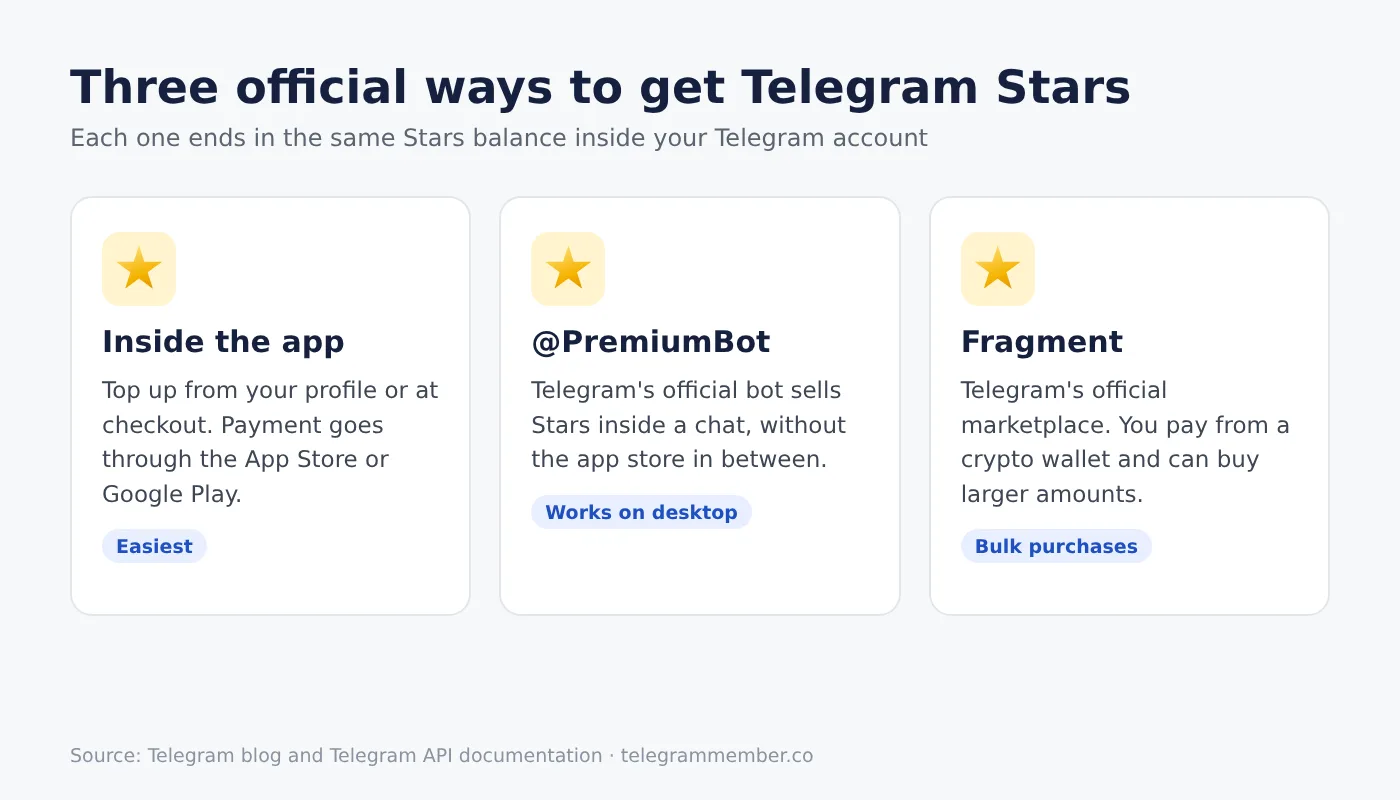
Inside the Telegram app. You can top up from your profile, or at the moment you pay for something in a bot or channel. On a phone, the payment goes through the App Store or Google Play.
Through @PremiumBot. This is Telegram's official bot for Premium and Stars. I use it on desktop, where there is no app store checkout.
On Fragment. Fragment is Telegram's official marketplace for usernames, numbers and Stars. You pay from a crypto wallet, and it allows larger purchases than in-app packs.
Prices differ by method and by country, and they change from time to time. Instead of repeating numbers here that would go stale, I keep them in one place: our page with the current Telegram Stars price by country, including a calculator that converts Stars to your currency.
You can also receive Stars without buying them. Friends can gift Stars to you, and if you run a channel, bot or group, your audience can send them to you, which I cover below.
What You Can Spend Telegram Stars On
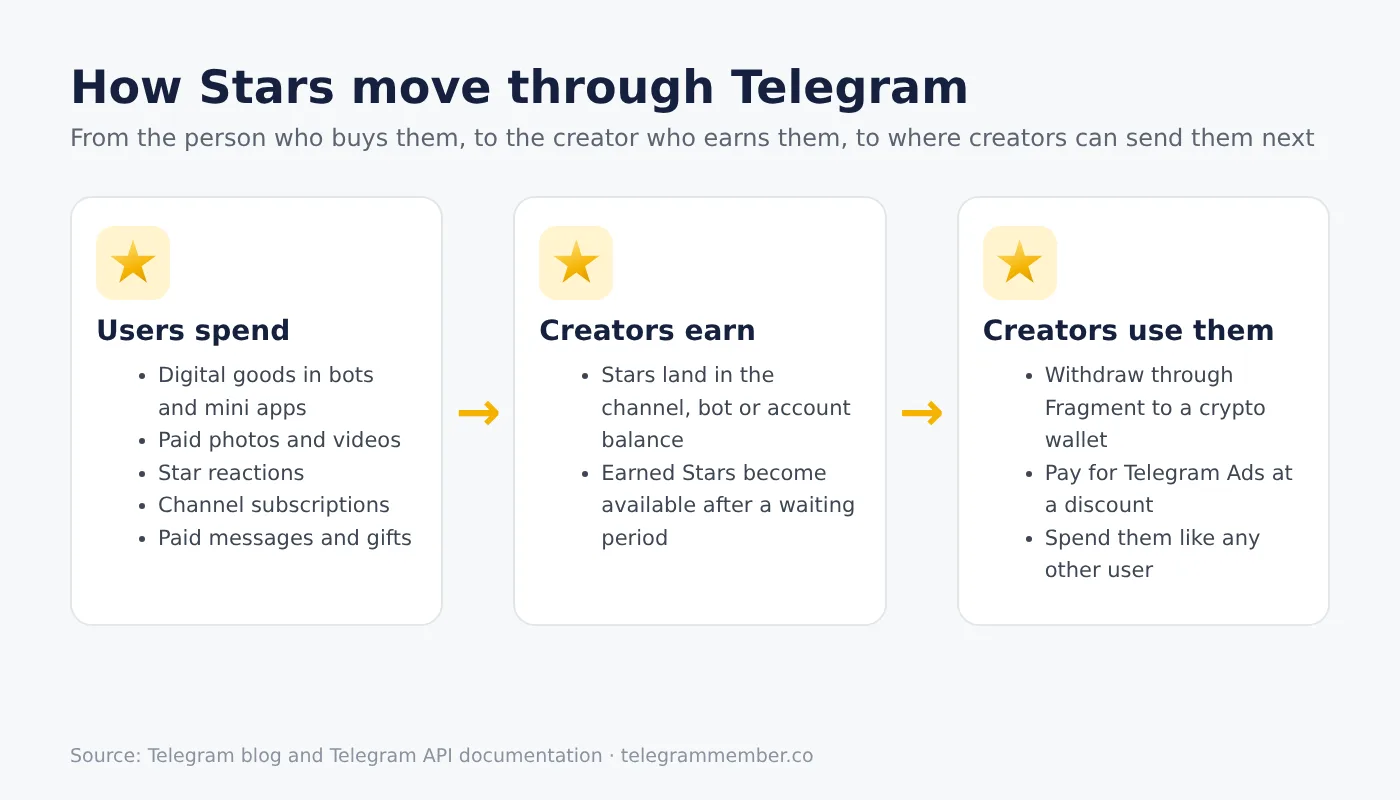
This list has grown a lot since 2024. These are the main things Stars pay for today:
Digital goods in bots and mini apps. Game items, subscriptions to bot features, courses and similar products. If you're a developer, our guide on how to build a Telegram mini app and add payment options shows where Stars fit.
Paid photos and videos. Channels and bots can post media that stays blurred until a reader pays to unlock it.
Star reactions. A paid reaction under a channel post, with a leaderboard of top supporters. These are different from the free emoji reactions everyone can send. If regular emoji reactions are what you're after, that's a separate thing; see our page on Telegram emoji reactions.
Channel subscriptions. Some private channels charge a monthly fee in Stars through a special invite link.
Paid messages. Some users and groups charge a few Stars for messages from people outside their contacts, which keeps spam away.
Gifts and Premium. You can send gifts to other users and channels, and you can use Stars to gift a Telegram Premium subscription. If you'd rather pay for Premium directly, here is how to buy Telegram Premium through every official route.
Suggested posts. You can offer a channel Stars to publish a post you submit, and the owner can accept, edit or decline it.
Live Stories. During a live stream in Stories, viewers can pin a comment or support the host with Stars.
What I like about this setup is that it's the same balance everywhere. Stars you receive from your audience can be spent on any of the items above, just like Stars you bought.
How Channel Owners and Creators Earn Stars
This is where Stars became interesting for me as a channel owner. The August 2024 Telegram update added the tools that most creators use today:
Star reactions. You turn them on in Channel Settings → Reactions → Enable Paid Reactions. According to Telegram, channel owners receive 100% of the Stars sent this way.
Paid media. You post a photo or video and set a price to unlock it.
Paid subscriptions. You create an invite link that charges a monthly fee to join a private channel.
Paid messages in groups. Group owners can charge Stars for each message, which the March 2025 update introduced alongside paid messages in private chats.
Suggested posts. Followers or brands can pay to have a post published in your channel, as described in the July 2025 update.
Stars are a separate income stream from Telegram's ad revenue sharing, where eligible channels earn from the official ads shown in them. If you want both, our guide to Telegram ad revenue sharing explains the eligibility rules and setup.
Withdrawing or Reinvesting the Stars You Earn
Earned Stars don't have to stay inside Telegram. Creators have two main options:
Withdraw through Fragment. You submit a crypto wallet address on Fragment, and Telegram pays out the value of your Stars. There is a minimum balance before you can withdraw, and Stars become available for withdrawal 21 days after you earn them.
Pay for Telegram Ads. Telegram's Stars documentation says Stars can pay for ads for your channel or bot at a 30% discount. For a growing channel, this is often a better use than cashing out.
The exact withdrawal minimum and the payout rate per Star are listed on the Stars price page I linked above, next to the prices, and we check them against Telegram's own numbers.
Refunds, Star Rating and Staying Safe
A few rules are worth knowing before you rely on Stars:
App store purchases can be refunded. Telegram notes that Stars bought through third parties like Apple can be refunded to the buyer within 21 days, which can then be taken back from the seller's balance. That's one reason the 21-day waiting period exists.
Your Star rating reflects your history. Telegram shows a rating based on your successful Stars transactions. Buying gifts, sending paid messages and funding suggested posts raise it; refunds lower it.
Only buy Stars from official sources. The in-app top-up, @PremiumBot and Fragment are the only places I'd ever buy Stars. Anyone selling "cheap Stars" in a private chat is a red flag. If you're unsure who you're dealing with, here is how to spot a fake Telegram account.
When Stars Are Worth It: What I've Learned
As a user, I mostly use Stars for small things: unlocking a paid post from a channel I follow, sending a gift, or paying for a feature inside a bot. For that, the in-app top-up is simply the fastest. When I need a larger amount for testing bots, I buy on Fragment instead.
As a channel owner, my advice is to start small. Turn on Star reactions and leave everything else alone for a few weeks. If readers actually send Stars, you know your audience is willing to pay, and a paid subscription or paid media becomes a reasonable next step. If nobody sends a single Star, that tells you something too, and it costs you nothing to find out.
One mistake I see often: owners lock their best content behind paid media before the channel has enough readers. A paywall works on an engaged audience, not on an empty one. Build the audience first, then give the most loyal readers a reason to pay.
Final Thoughts
Telegram Stars turned Telegram into a place where creators can earn directly from their audience, and where users can pay for digital content without leaving the app. Buy them only from official sources, keep an eye on the 21-day rules if you earn them, and treat them as a tool that rewards an audience you've already built.
Frequently asked questions
What are Telegram Stars used for?
How do I get Telegram Stars?
Are Telegram Stars real money?
How do channel owners earn Telegram Stars?
When can I withdraw the Stars I earned?
Do I need Telegram Premium to use Stars?
Related articles

Proven Strategies to Make Money on Telegram in 2025: Your Complete Guide to Earn Money with Telegram
How to Create Your Own Telegram Bot: A Complete Step-by-Step Tutorial for Beginners

Telegram Premium: Your Complete Guide to the Ultimate Premium Subscription Experience

Telegram Privacy & Transparency in 2025: What Every Channel Owner Should Know

Buy Views For Telegram Channel
Buy Telegram Channel Views
Comments
No comments yet. Be the first to share your thoughts.