Article
How to Stop Spam in Telegram Groups: Settings, Join Requests and AI Guardians
The eight settings I use to stop spam in Telegram groups, from permissions and slow mode to join requests, Aggressive Anti-Spam and AI Guardians, plus the setup I use before sharing any new group link.

Every Telegram group I've run has had the same turning point. For the first few hundred members, the chat is quiet and friendly. Then the group shows up in search, someone shares the invite link in a big channel, and one morning the chat is full of crypto offers, fake job posts and bots dropping links. If you don't have the right settings in place before that day, you spend hours deleting messages and banning accounts by hand.
The good news is that Telegram gives group owners a lot of protection, and most of it is free and built in. These are the eight settings I use to stop spam in Telegram groups, in the order I turn them on, plus the setup I use for every new group.
Why Telegram Groups Attract Spam
Spammers go where the audience is. A group with a public username can be found in Telegram search, and a shared invite link can travel far beyond the people you meant to invite. Once a group passes a few hundred members, it becomes worth a spammer's time to join with several accounts, post once and leave.
Most of the spam I see falls into three types:
Link drops. A new account joins, posts a link to a channel, a "giveaway" or a phishing page, and disappears.
Bot raids. Many accounts join within minutes and post the same message, often with images so text filters miss it.
Private message spam. Accounts join only to collect the member list and message people one by one. Telegram's spam FAQ treats unsolicited messages and adding people to groups without consent as spam, and reported accounts get limited.
Each setting below blocks at least one of these.
1. Lock Down Member Permissions
This is the first thing I change in any group. Open the group, tap its name, then Edit → Permissions. Here you decide what regular members are allowed to do. The defaults are generous, and spammers count on that.
Turn off "Add Members" unless you really want members inviting others. It stops spam accounts from pulling more spam accounts in.
Limit links and media if your group is mainly for text discussion. Most spam is a link or an image, so this alone removes a large share of it.
Keep "Pin Messages" and "Change Group Info" for admins. A spammer who can change the group photo or pin a message can do real damage.
You can also give individual trusted members more rights than everyone else from the same screen, so locking things down doesn't punish your regulars.
2. Turn On Slow Mode
Slow Mode lets each member send only one message per interval you choose, with a timer showing how long they have to wait. Telegram added it in its 2019 update, and it's still one of the best tools against bot raids, because a bot that can post once every minute is far less useful than one that can post fifty times.
You'll find it at the bottom of the same Permissions screen. I use a short interval for everyday chat and raise it for a few hours during a raid. In a busy discussion group, a long interval frustrates real members, so I don't leave it high permanently.
3. Require Admin Approval to Join
Join requests are the most effective setting I know against spam, because they stop the problem before an account is even in the group. When approval is on, anyone who opens your link sends a request instead of joining, and an admin approves or declines it.
For a private group, create an invite link and turn on "Request Admin Approval" for that link.
For a public group, open the group type settings and turn on "Approve New Members".
Before approving, you can open the applicant's profile, and you can message them first. An empty profile with no photo and a random name, created yesterday, is almost always a spam account. The cost is that someone has to process requests, which is exactly the job AI Guardians and bots can take over (see below).
4. Enable Aggressive Anti-Spam
Telegram runs its own spam filters in every group. In groups with more than 200 members, admins can switch those filters to a stricter mode called Aggressive Anti-Spam, introduced in the December 2022 update. You'll find the toggle in the group's Administrators section.
In my experience, it catches most of the obvious link drops without any setup. Occasionally it removes a real message. When that happens, you can find it in Recent Actions and report it as a false positive, which helps Telegram improve the filter.
5. Let an AI Guardian Screen New Members
Since June 2026, admins can add AI bots as administrators whose job is to guard the entrance. Telegram calls them AI Guardians in its June 2026 update. They process join requests, can screen applicants through a mini app before letting them in, and, if you allow it, can also act against members who post spam in the chat.
This solves the one weakness of join requests: nobody has to sit and approve people by hand. Give the guardian only the rights it needs, usually approving members and deleting messages, and test it on a small group before using it on your main one.
6. Add an Anti-Spam Bot, Carefully
Third-party moderation bots can do things Telegram's built-in filters don't, like captcha checks for new members, word filters or automatic warnings. They're useful, but a bot with admin rights is also a risk if it's badly made or gets abandoned by its developer.
My rules: only use bots with a clear developer and active updates, and give them the smallest set of admin rights that works. A moderation bot needs to delete messages and ban users; it never needs the right to add new admins. If you haven't done it before, here's how to add a bot to a Telegram group and set its rights, and how to add admins and choose their permissions.
One technical detail that confuses many owners: bots in groups run in privacy mode by default and only see commands and messages addressed to them. A moderation bot has to be an admin, or have privacy mode turned off by its developer, to see and delete spam.
7. Charge Stars for Messages
For groups that get a steady stream of promotional posts, Telegram offers a stronger filter: a price on every message. Since the March 2025 update, group owners can turn on "Charge Stars for Messages" in Permissions, so each message from a regular member costs a small number of Telegram Stars.
Spam becomes expensive, and the Stars go to the group's balance. It's not for every community, since it also puts a cost on real members, but for groups where people mainly come to advertise, it works.
8. Report, Ban and Clean Up
Even with all of the above, some spam gets through. When it does:
Report the message as spam instead of only deleting it. Reports help Telegram limit the account across the platform, not just in your group.
Ban the account and delete all its messages in one step. When you remove a member, Telegram lets you delete everything they posted at the same time.
Check Recent Actions to see what happened while you were away: who joined, who was removed, and what the filters deleted.
If one of your own members tells you their account was limited after a report, they can contact the official @SpamBot to check their status.
My Anti-Spam Setup for Every New Group
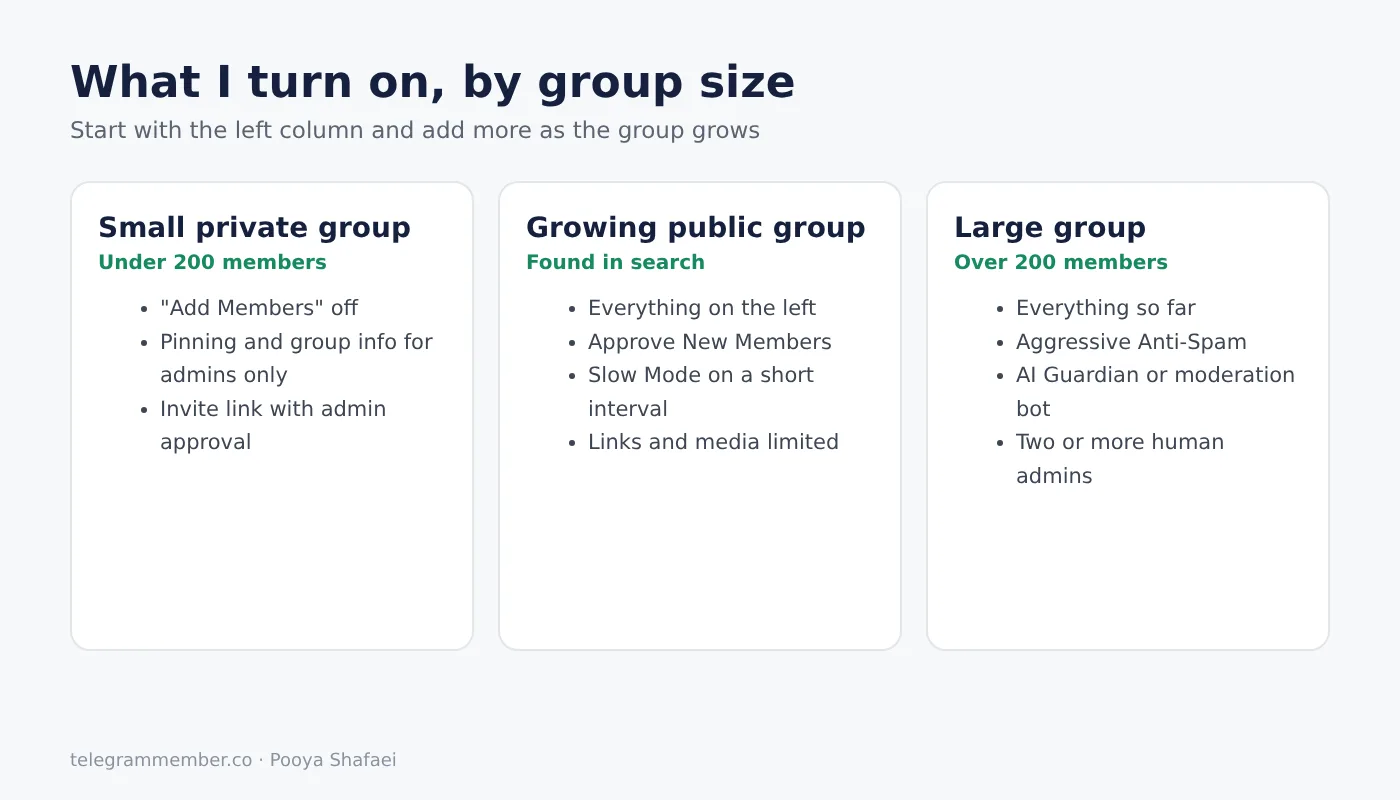
This is the order I go through when I set up a new group, before I share the link anywhere:
Permissions: "Add Members" off, pinning and group info for admins only.
Join approval on, either on the invite link or with "Approve New Members".
Slow Mode on a short interval.
Aggressive Anti-Spam on as soon as the group passes 200 members.
An AI Guardian or a moderation bot to handle join requests once there are too many to approve by hand.
At least two human admins in different time zones, so raids don't run for hours unnoticed.
If you're still at the planning stage, my guide on creating a Telegram group covers the basics, and these security tips for group admins cover protecting the admin accounts themselves, which matters just as much as filtering spam.
Final Thoughts
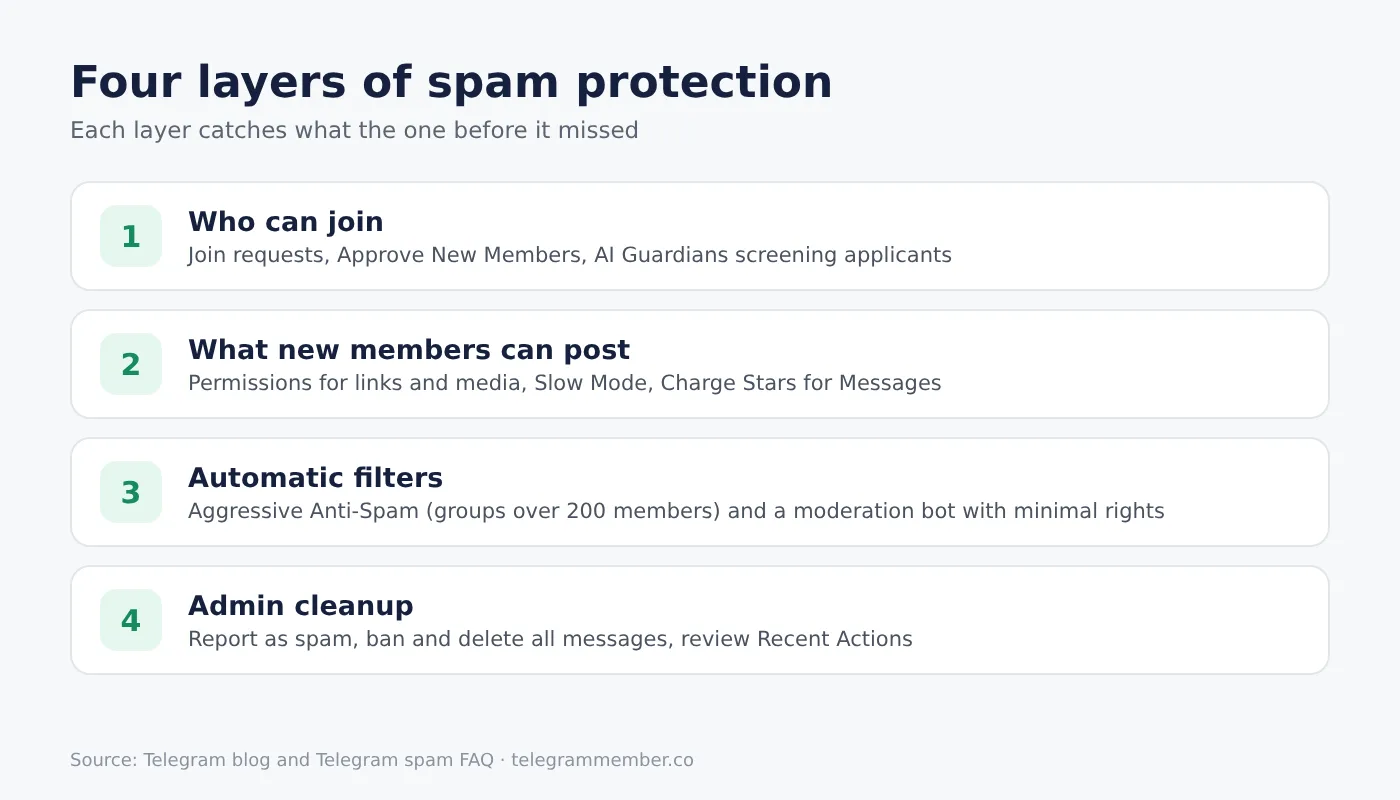
Stopping spam in a Telegram group isn't about one magic bot. It's layers: decide who can join, limit what new members can post, let Telegram's filters and an AI Guardian do the repetitive work, and keep a human admin for everything else. Set it up before your group grows, not after the first raid.
Frequently asked questions
How do I stop spam in my Telegram group?
What is Aggressive Anti-Spam in Telegram?
How do I make people request to join my Telegram group?
What are AI Guardians in Telegram?
Does Slow Mode stop spam bots?
Can I charge for messages in a Telegram group?
Related articles

How to Find and Join Telegram Groups and Channels in 2026
Every method I use in 2026 to find active Telegram groups and channels: Global Search, Similar Channels, the C…

Telegram AI Bots: How to Automate Your Channel in 2025

How to Add a Bot to a Telegram Group or Channel
How I add bots to Telegram groups and channels on Android, iPhone and desktop: the one-tap add links, which ad…

How to stop the loss of telegram members?
Why Telegram channels lose members and how to stop it: content, ad balance, posting times and automatic top-up…

How to Add Unlimited Members to a Telegram Group or Channel (2026 Guide)
Groups stop at 200,000 members and channels have no cap, but direct adding stops much earlier. Here is what th…

How to Find, Copy and Share Your Telegram Profile Link
Find and copy your Telegram profile link on any device, share it without exposing your number, and fix it fast…
Comments
No comments yet. Be the first to share your thoughts.